Passwords
IMPORTANT: if you apply a password then you forget it, there's no way for recovering it. Please backup a non password protected copy before applying a password.
With the “Hypertext >Passwords” dialog, the simplest action is to assign one password for the entire ebook. But you can do more. For example you can create an ebook with ten free introductory pages and protect the rest of the document with a password. Or you can protect different sections of the ebook with different passwords. Or you can force the program to automatically assign a personal password (or passwords) for each user.
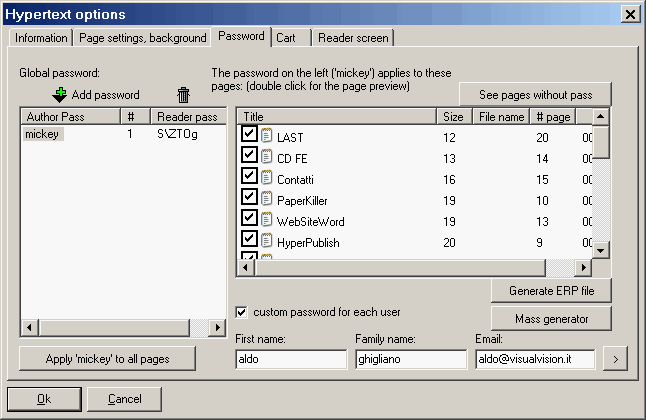
When you have just created a new presentation, the simplest thing you can do is add a single password to the whole document. If you want to do this, just click the "Add" button, enter the password (e.g. "mickey", see Fig. 18), then the program will ask you if you want to assign it to all pages. Say Yes and you are done. All your users will be able to read the ebook by just entering the password "mickey".
The ebook prompts for the password the first time you attempt to enter a password protected page.
Click on the image for more information:
On the left, you see the global password list. When you select a password on the left, you see on the right what pages are protected with that password (checked pages are protected, unchecked ones not).
Usually it is wise to not protect the cover page (select the password "mickey" on the left, then just search for the cover page on the right list and uncheck it), this way if the user forgets about the password, well at least he/she will be able to know what ebook she/he is holding!
To leave a page unprotected, just click the "See pages without pass" and check every page you want to leave unprotected.
If you wish to set a different password for each user (we call this "reader password", while the unique password or password seed is the "author password"), you just have to put a check-mark on "custom password for each user", then save the file (Save all), then create the ebook, and keep the source file (AEH) you used for creating the ebook in a safe place.
When this option is selected, the ebook remains the same for all users (just like when there is just one password - the ebook will be the same for everybody), it is the match username / email and password(s) that changes. You can distribute infinite ebooks as the ebook "knows" all the passwords.
When you sell an ebook to a given user, you open the ebook source file, you use "Hypertext >Passwords", you enter the
user data, and the password(s) is calculated on-the-fly and can be printed / faxed / emailed to the user.
Example: say we have the document abc.aeh, with the author password mickey associated to all the pages; say this ebook is enabled to personal passwords for each user ("custom password for each user" is checked); say you are the end user aldo ghigliano aldo@visualvision.it. The author will give you the password S\ZTOg (see above), this will enable you to see the ebook. In other words, for this ebook, the password for aldo is S\ZTOg and will always be asked the first time he enters one of the protected pages. It will work ONLY if aldo enters the data aldo ghigliano aldo@visualvision.it when the ebook asks for them (the end user may also click the right mouse button and choose the "User data" menu).
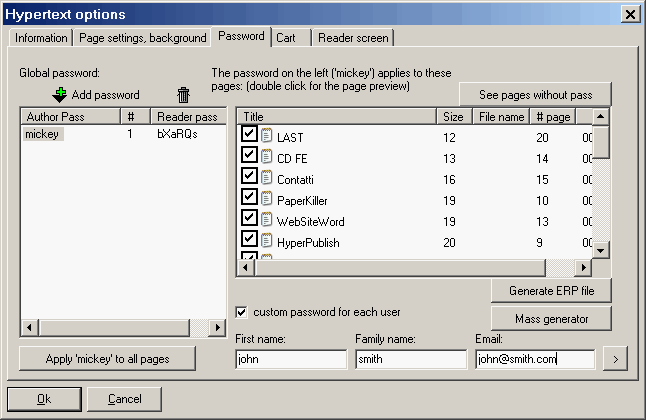
For the same file, for the end user john smith john@smith.com, the password will be as below (bXaRQs):
You will supply the same ebook to John and to Aldo, each with their own password(s).
The end user knows nothing (and should not know) about the author password.
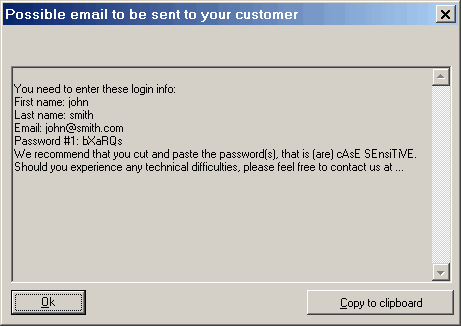
The program includes a facility to help you print/email the password to the end user: just insert the user data, then press
the button ">" on the bottom right. For john you will have what is below:
You need to enter these login info:
First name: john
Last name: smith
Email: john@smith.com
Password #1: bXaRQs
We recommend that you cut and paste the password(s), that is (are) cAsE SEnsiTiVE.
Should you experience any technical difficulties, please feel free to contact us at ...
For test purpose we do recommend you test the ebook on a different PC. This way you will avoid mistakes (your PC will preset you as user and you should not change the preset). If the user needs to "reset" (clear) his name/email or the passwords due to a mistake, he/she can use the right mouse button (User data and Reset passwords) or the "?" menu.
It is useful to repeat that when you use "custom password for each user" the ebook is the same for all users, it is the match username / email and password(s) that changes. You can distribute infinite ebooks.
Then reader's password(s) can be calculated at any time with the dialog above (just open the same file you used for creating the ebook, then you can calculate on-the-fly infinite passwords).
Also, please notice that the "edit password" that you can set up in the "Hypertext >Current hypertext properties" dialog,
first tab, has nothing to do with the ebook password protection. It is an edit protection password (it protects you the author in the event your end user do purchase EBooksWriter then tries to open the AEH file with EBooksWriter).
If you want to set up an
expiration date, and/or disable the print and the clipboard copy, choose the first tab (
click here). If the expiry date is February 23 2010, the document will be visible until midnight of the 23, so it actually expires the first second of the 24th.
When a page is password protected, it is crippled with a strong 128 bit algorithm.
Your passwords are stored in a .EWP file (don't distribute and don't delete!!), saved in the same directory of your AEH file.
"Lock to PC" protection is available with an external service,
click here.
Other VisualVision good programs:
|
The professional fast and easy e-book creator builder compiler protector software - the great program for creating building making good ebooks
|